Apartment Management Software in Bangladesh: A Complete Guide for Owners and Committees
Running a building on a ledger, an Excel sheet and a WhatsApp group works until it doesn't. Here is what apartment management software does, how one month compares on paper and in an app, how to choose a system in Bangladesh, and what it costs.
What is apartment management software?
Apartment management software is an app or website that keeps a building's records in one place: who lives in which flat, what each flat owes in rent or service charge, who has paid and who has not, and what the building spent this month. It does the job of the paper ledger, but the adding up, the reminders and the record keeping happen on their own.
In Bangladesh it is used by landlords with one rented building, by apartment owners' committees that collect service charges, and by people who look after several buildings at once. Open the app and you see what came in this month, what is still owed, and by whom.
Apartment management software vs. a building management system (BMS)
Search for "building management system in Bangladesh" and most results are about a BMS: control panels for air conditioning, lighting, lifts and fire alarms, sold by engineering companies. That is equipment, not accounts.
If what you need is rent, monthly bills, service charges, tenants and staff, you are looking for apartment management software (sometimes called a flat management system or building management software). The rest of this guide is about that.
Where the ledger and Excel fall short
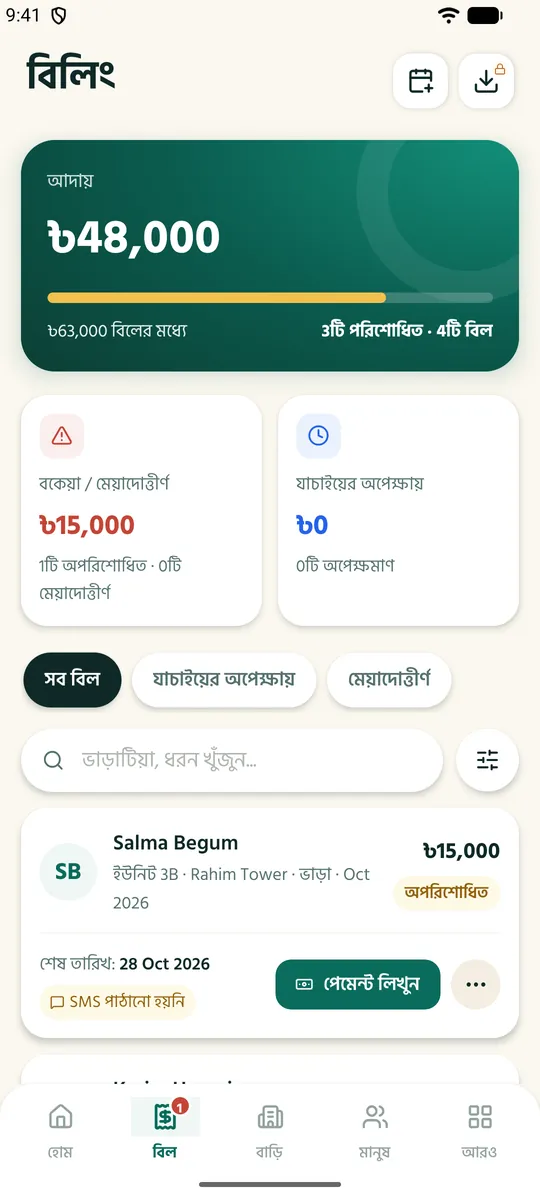
Many buildings still keep their accounts in a ledger, a spreadsheet and a WhatsApp group. At the start of the month every flat's bill is written by hand, payments are matched against bKash messages, and at the end of the year the committee's books rarely add up on the first try. The difference looks like this:
| Task | Ledger / Excel | With software |
|---|---|---|
| Monthly bills | Written flat by flat | Every flat billed in one click on the 1st |
| Dues | Found by searching the ledger | Who paid and who owes, at a glance |
| Reminders | Phone calls, one by one | Sent by SMS and notification on their own |
| Payments | Matched against bKash messages | The tenant sends a receipt; you check it in one tap |
| History | A lost page is lost money | Who changed what, and when, is recorded |
One month on paper vs. in an app
Take a building with 20 flats. Here is the same month, run two ways:
| When | On paper | In the app |
|---|---|---|
| The 1st | 20 bills written one by one, tenants told separately | Every bill in one click, sent to each tenant's phone |
| The 10th | Search the ledger for who has not paid, then call | The list of dues is ready; reminders go out on their own |
| The 20th | bKash messages and the ledger side by side | Check the tenant's receipt in one tap |
| Month end | Add up income and spending, often twice | What came in, what went out, what is left — ready |
What to look for when choosing one
Not every system is built for buildings in Bangladesh. Check for these:
- ✓Bangla and English — owners, tenants and guards should all understand it.
- ✓One-click monthly bills — rent, gas, water and service charge together.
- ✓bKash and Nagad payments checked — against a receipt or transaction ID.
- ✓A login for tenants — so they see their bills and send payments from their own phone.
- ✓Control over who sees what — a manager sees only the buildings you give them.
- ✓Expenses and committee funds — who has paid into the fund and who has not.
- ✓A mobile app — so you can follow the building from anywhere.
- ✓A free start — try it on your own building before you pay.
MyBasha does all of this.
Free forever for 1 building and up to 5 flats — no card needed.
What tenants get
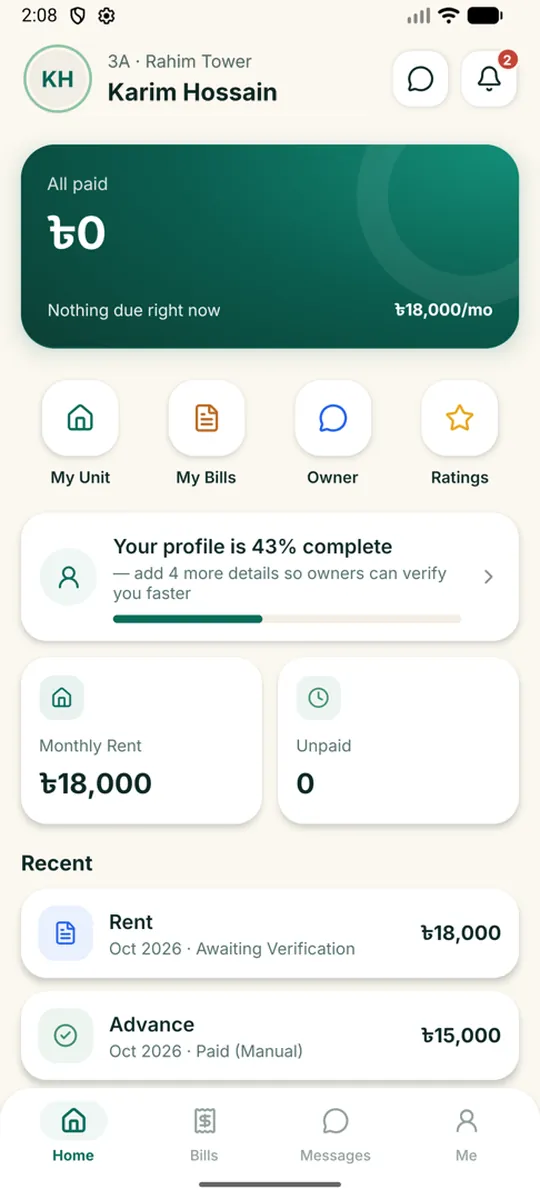
The software is not only for the owner: when paying is easy for tenants, the money arrives on time. Tenants get a login by SMS and see this month's bill and every past payment on their own phone.
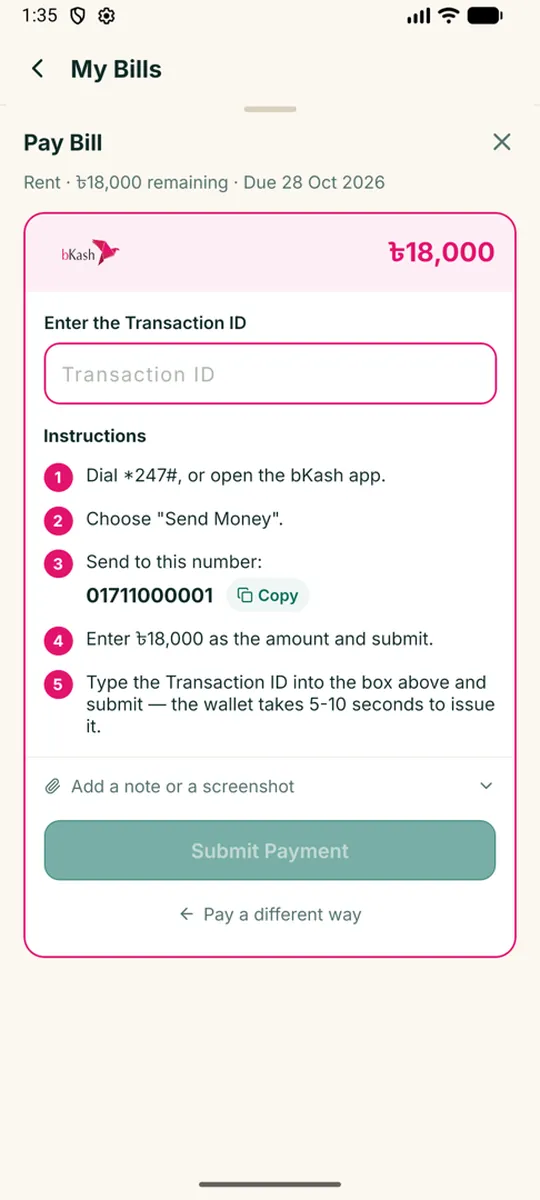
To pay by bKash or Nagad, the app walks them through it step by step — which number, how much — and once they enter the transaction ID it goes to the owner to check. Tenants pay nothing to use it.
Who uses it
Landlords
Rent, bills and tenant records for a rented building. Which flat is empty and who lives where, at a glance. More: how to manage house rent without a ledger.
Apartment owners' committees
Service charges and contributions from flat owners, shared expenses and staff salaries — everyone sees the same accounts, so there is less doubt. More: how to calculate apartment service charges.
Several buildings
All buildings in one account, each with its own accounts. Each building can have its own manager.
Who sees what: security and privacy
A building's accounts hold both money and people's personal details, so who sees what matters:
- ✓Managers — see only the buildings you give them; the rest stays yours.
- ✓Guards — use their own login for the gate and parking log only, never rent, bills or anyone's NID. See the digital gate log.
- ✓Tenants — see only their own bills and payments.
- ✓NID images — are never on an open link.
- ✓A history of every action — who changed a bill or took a payment, and when.
- ✓Daily backups — so the records are not lost.
Moving from the ledger to the app
- 1Start at the start of a month. Begin on the 1st so the old and new records never mix.
- 2Enter the building, flats and rents. Open a free account and set each flat's rent.
- 3Add your current tenants. Enter their details; they get a login by SMS. For a new tenant, see the new-tenant checklist.
- 4Keep the ledger for the first month. Comparing the two builds confidence; from the next month, the app alone.
- 5One click on the 1st. Every flat's bill goes out together, and the app reminds anyone who has not paid.
What it costs
MyBasha has no packages: two numbers set the price — how many buildings and how many flats. The Free plan covers 1 building and up to 5 flats. Beyond that it is Tk 200 a month as a platform fee, plus Tk 100 per building and Tk 20 per flat.
Example: a building with 20 flats → Tk 200 + Tk 100 + 20 × Tk 20 = Tk 700 a month. Pay for 6 months and save 15%, or for a year and save 30%.
Tenants and flat owners pay nothing. Work out the price for your building →
Questions and answers
Can I use apartment management software for free?
Yes. MyBasha is free forever for 1 building and up to 5 flats — no time limit and no card.
Do bKash or Nagad payments go through the app?
No. The money goes straight to your own bKash, Nagad or bank account. The tenant sends the transaction ID or a receipt, and you check it in one tap.
Is there an app? Does it work on iPhone?
There is an Android app for owners, managers, tenants and guards. On an iPhone the whole site works in the browser.
Is this the same as a BMS?
No. A BMS controls a building's equipment, such as air conditioning, lighting and fire alarms. Apartment management software keeps its accounts: rent, bills, service charges, tenants and staff.
Is my data safe?
Every action is recorded, the data is backed up every day, and personal images such as NID cards are kept private. You decide who sees what.
Add your building today
Start on the free plan. Upgrade when your buildings or flats grow.
Start free →